PRODUCT DESIGN
PRODUCT DESIGN
⋅
BAKING APPLICATION
BAKING APPLICATION
Designing for the moment before a recipe becomes a guess.
Designing for the moment before a recipe becomes a guess.
aBakecus is a mobile baking companion for home bakers who can follow a recipe but run into trouble the moment they try to adapt one. It covers three modes of use: discovering recipes and community content, executing a bake with hands-free guidance, and adjusting or building recipes with precision tools grounded in baking science.
aBakecus is a mobile baking companion for home bakers who can follow a recipe but run into trouble the moment they try to adapt one. It covers three modes of use: discovering recipes and community content, executing a bake with hands-free guidance, and adjusting or building recipes with precision tools grounded in baking science.
ROLE
ROLE
UI/UX Designer
UI/UX Designer
SCOPE
SCOPE
Mobile APP
Mobile APP
TIMELINE
TIMELINE
Academic Year
Academic Year
TEAM
TEAM
Solo Project
Solo Project
STATUS
STATUS
Completed
Completed


overview
overview
The Idea
The Idea

Baking may feel creative, but it's built on ratios and reactions. Small changes to ingredients can significantly affect the final result. Yet most baking apps treat recipes as fixed instructions, making it difficult to understand or adapt the formula behind them. That led to a simple question:
Baking may feel creative, but it's built on ratios and reactions. Small changes to ingredients can significantly affect the final result. Yet most baking apps treat recipes as fixed instructions, making it difficult to understand or adapt the formula behind them. That led to a simple question:
Baking may feel creative, but it's built on ratios and reactions. Small changes to ingredients can significantly affect the final result. Yet most baking apps treat recipes as fixed instructions, making it difficult to understand or adapt the formula behind them. That led to a simple question:
What if bakers could work with recipes as formulas instead of static documents?
What if bakers could work with recipes as formulas instead of static documents?
From that idea, aBakecus was born. The name combines abacus and baking, a nod to the calculation behind every successful bake.
From that idea, aBakecus was born. The name combines abacus and baking, a nod to the calculation behind every successful bake.
From that idea, aBakecus was born. The name combines abacus and baking, a nod to the calculation behind every successful bake.
context
context
Why This Space, Why Now
Why This Space, Why Now
Home baking saw a major rise during the pandemic, creating a much larger community of regular home bakers. Many now need more than just recipes, especially those baking around dietary restrictions like gluten free, dairy free, or egg free. Existing tools have not kept up with those needs.
Home baking saw a major rise during the pandemic, creating a much larger community of regular home bakers. Many now need more than just recipes, especially those baking around dietary restrictions like gluten free, dairy free, or egg free. Existing tools have not kept up with those needs.
Home baking saw a major rise during the pandemic, creating a much larger community of regular home bakers. Many now need more than just recipes, especially those baking around dietary restrictions like gluten free, dairy free, or egg free. Existing tools have not kept up with those needs.

research
research
Understanding the Problem
Understanding the Problem
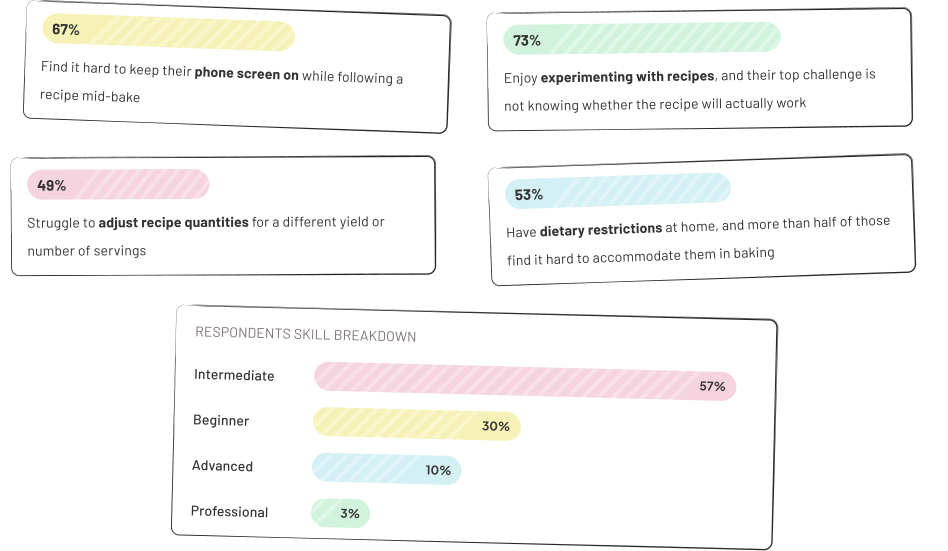
To understand what bakers actually struggle with, I shared a Google Form in baking focused subreddits to reach people already active in the hobby. I received 70 usable responses, many with detailed accounts of where and why baking broke down for them.
To understand what bakers actually struggle with, I shared a Google Form in baking focused subreddits to reach people already active in the hobby. I received 70 usable responses, many with detailed accounts of where and why baking broke down for them.
To understand what bakers actually struggle with, I shared a Google Form in baking focused subreddits to reach people already active in the hobby. I received 70 usable responses, many with detailed accounts of where and why baking broke down for them.
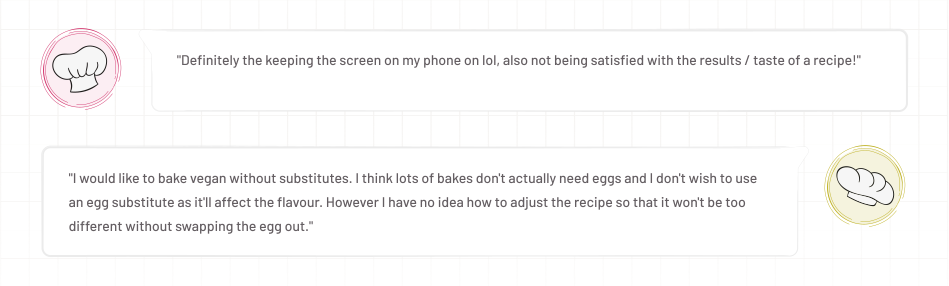
Here were some open-ended responses from the survey:
Here were some open-ended responses from the survey:
Here were some open-ended responses from the survey:
Along side, two things came up in the in-person conversations that the survey alone wouldn't have surfaced:
Along side, two things came up in the in-person conversations that the survey alone wouldn't have surfaced:
Along side, two things came up in the in-person conversations that the survey alone wouldn't have surfaced:

competitive analysis
competitive analysis
What Already Exists
What Already Exists
Five tools are doing parts of this. Each solves one piece reasonably well. None of them combine these capabilities, and none try to build the user's understanding of baking rather than just answering their immediate question.
Five tools are doing parts of this. Each solves one piece reasonably well. None of them combine these capabilities, and none try to build the user's understanding of baking rather than just answering their immediate question.
Five tools are doing parts of this. Each solves one piece reasonably well. None of them combine these capabilities, and none try to build the user's understanding of baking rather than just answering their immediate question.

users
users
Who I Was Designing For
Who I Was Designing For
The survey showed 57% intermediate, 30% beginner, 13% advanced or professional. Three groups, three different relationships with baking's complexity — each one shaping a different layer of the product.
The survey showed 57% intermediate, 30% beginner, 13% advanced or professional. Three groups, three different relationships with baking's complexity — each one shaping a different layer of the product.
The survey showed 57% intermediate, 30% beginner, 13% advanced or professional. Three groups, three different relationships with baking's complexity — each one shaping a different layer of the product.

design process
design process
From Research to Structure
From Research to Structure
With the problem space and users defined, the next step was working out how to organise a product that needed to serve meaningfully different needs without feeling like three separate apps bolted together.
With the problem space and users defined, the next step was working out how to organise a product that needed to serve meaningfully different needs without feeling like three separate apps bolted together.
With the problem space and users defined, the next step was working out how to organise a product that needed to serve meaningfully different needs without feeling like three separate apps bolted together.
Site map
Site map
Site map
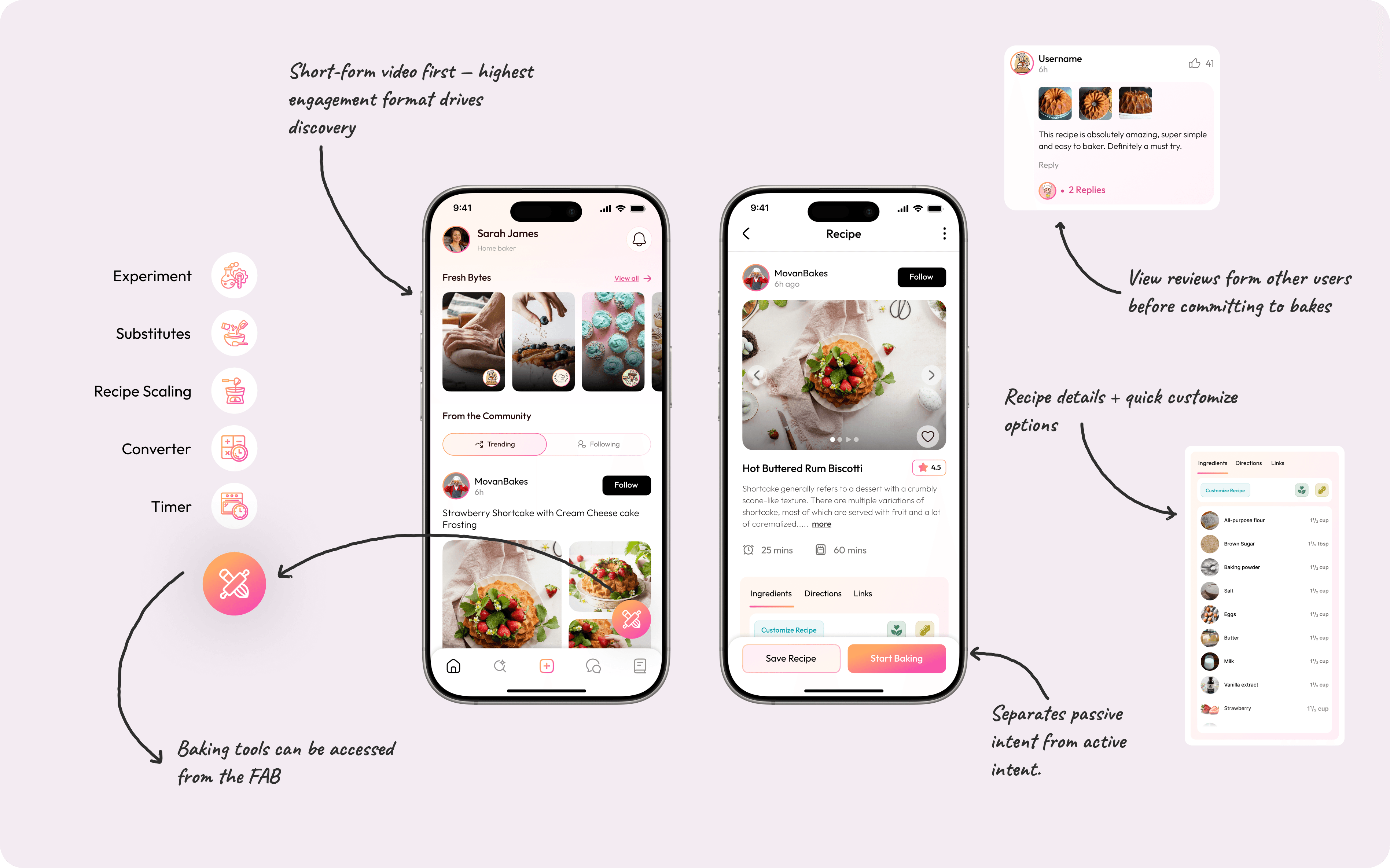
The core structural decision was to separate destinations from tools. Content and community lived in the tab bar, while baking utilities were grouped behind a floating action button, making them accessible from anywhere without taking up permanent navigation space.
The core structural decision was to separate destinations from tools. Content and community lived in the tab bar, while baking utilities were grouped behind a floating action button, making them accessible from anywhere without taking up permanent navigation space.
The core structural decision was to separate destinations from tools. Content and community lived in the tab bar, while baking utilities were grouped behind a floating action button, making them accessible from anywhere without taking up permanent navigation space.

Userflow
Userflow
Userflow
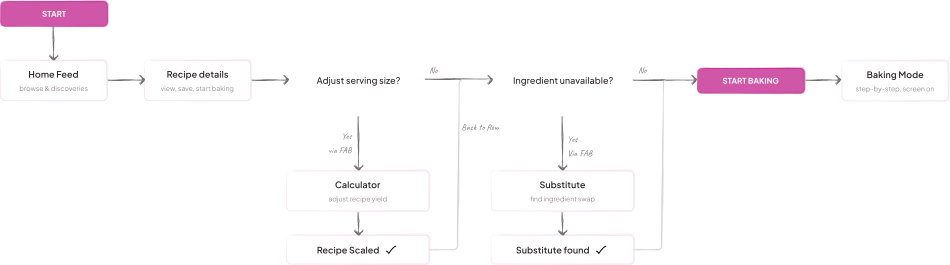
The flow maps how a user might move from finding a recipe in the community, to scaling it, to substituting an ingredient, to entering baking mode. The features are connected, not siloed.
The flow maps how a user might move from finding a recipe in the community, to scaling it, to substituting an ingredient, to entering baking mode. The features are connected, not siloed.
The flow maps how a user might move from finding a recipe in the community, to scaling it, to substituting an ingredient, to entering baking mode. The features are connected, not siloed.
Wireframes
Wireframes
Wireframes
Started with hand-drawn sketches before moving to Figma, keeping layout decisions fast and revisable before investing time in visual detail.
Started with hand-drawn sketches before moving to Figma, keeping layout decisions fast and revisable before investing time in visual detail.
Started with hand-drawn sketches before moving to Figma, keeping layout decisions fast and revisable before investing time in visual detail.

design decisions
design decisions
Feature Decisions and Why
Feature Decisions and Why
Before walking through individual screens, one structural choice underpins all of them. The app runs on two distinct access patterns, each designed around a different user intent.
Before walking through individual screens, one structural choice underpins all of them. The app runs on two distinct access patterns, each designed around a different user intent.
Before walking through individual screens, one structural choice underpins all of them. The app runs on two distinct access patterns, each designed around a different user intent.
The bottom navigation bar handles the discovery and baking flow: Home feed, Search, New Post, Ask Us, and Library. These are the screens a user visits when they want to find a recipe, follow someone, or get help mid-bake.
The bottom navigation bar handles the discovery and baking flow: Home feed, Search, New Post, Ask Us, and Library. These are the screens a user visits when they want to find a recipe, follow someone, or get help mid-bake.
The bottom navigation bar handles the discovery and baking flow: Home feed, Search, New Post, Ask Us, and Library. These are the screens a user visits when they want to find a recipe, follow someone, or get help mid-bake.
A floating action button on the home screen gives instant access to the precision tools: Scale Recipe, Substitute, Experiment, Timer, and Converter. This keeps the tools available without cluttering the primary navigation for users who just want to browse.
A floating action button on the home screen gives instant access to the precision tools: Scale Recipe, Substitute, Experiment, Timer, and Converter. This keeps the tools available without cluttering the primary navigation for users who just want to browse.
A floating action button on the home screen gives instant access to the precision tools: Scale Recipe, Substitute, Experiment, Timer, and Converter. This keeps the tools available without cluttering the primary navigation for users who just want to browse.
Home Feed and Community (Entry point for all users)
Home Feed and Community (Entry point for all users)
Home Feed and Community (Entry point for all users)
The app opens to a community feed: Fresh Bytes (short recipe videos) at the top, image-based recipe posts below, filterable across Latest, Trending, and Following. Tapping a recipe opens a detail view with description, prep and bake time, Ingredients/Directions/Links tabs, and user reviews. Start Baking is the primary CTA. Customize Recipe carries the recipe directly into the scaling or substitution tools.
The app opens to a community feed: Fresh Bytes (short recipe videos) at the top, image-based recipe posts below, filterable across Latest, Trending, and Following. Tapping a recipe opens a detail view with description, prep and bake time, Ingredients/Directions/Links tabs, and user reviews. Start Baking is the primary CTA. Customize Recipe carries the recipe directly into the scaling or substitution tools.
The app opens to a community feed: Fresh Bytes (short recipe videos) at the top, image-based recipe posts below, filterable across Latest, Trending, and Following. Tapping a recipe opens a detail view with description, prep and bake time, Ingredients/Directions/Links tabs, and user reviews. Start Baking is the primary CTA. Customize Recipe carries the recipe directly into the scaling or substitution tools.
Baking Mode (Triggered from any recipe's Start Baking CTA)
Baking Mode (Triggered from any recipe's Start Baking CTA)
Baking Mode (Triggered from any recipe's Start Baking CTA)
One step at a time, screen stays active — "Baking Mode Enabled" confirmed at the top. 67% of survey respondents said keeping their phone screen on mid-bake was a consistent problem, and the in-person interviews surfaced the same complaint unprompted from multiple people. Touch targets are enlarged, and Ask Us is accessible mid-step without leaving the screen.
One step at a time, screen stays active — "Baking Mode Enabled" confirmed at the top. 67% of survey respondents said keeping their phone screen on mid-bake was a consistent problem, and the in-person interviews surfaced the same complaint unprompted from multiple people. Touch targets are enlarged, and Ask Us is accessible mid-step without leaving the screen.
One step at a time, screen stays active — "Baking Mode Enabled" confirmed at the top. 67% of survey respondents said keeping their phone screen on mid-bake was a consistent problem, and the in-person interviews surfaced the same complaint unprompted from multiple people. Touch targets are enlarged, and Ask Us is accessible mid-step without leaving the screen.

Recipe Scaling (Accessed via the floating action button)
Recipe Scaling (Accessed via the floating action button)
Recipe Scaling (Accessed via the floating action button)
Scaling starts with a type-selection step because the calculation differs: adjusting servings is proportional multiplication, changing pan size is a surface area problem, changing layers is neither. After selecting a type and recipe, the results screen shows each ingredient's new quantity alongside the original — no mental arithmetic, no switching between screens to remember what it said before.
Scaling starts with a type-selection step because the calculation differs: adjusting servings is proportional multiplication, changing pan size is a surface area problem, changing layers is neither. After selecting a type and recipe, the results screen shows each ingredient's new quantity alongside the original — no mental arithmetic, no switching between screens to remember what it said before.
Scaling starts with a type-selection step because the calculation differs: adjusting servings is proportional multiplication, changing pan size is a surface area problem, changing layers is neither. After selecting a type and recipe, the results screen shows each ingredient's new quantity alongside the original — no mental arithmetic, no switching between screens to remember what it said before.

Substitution (Accessed via the floating action button)
Substitution (Accessed via the floating action button)
Substitution (Accessed via the floating action button)
Enter the ingredient, the quantity from your recipe, and an optional dietary filter. Results are ranked — a Recommended option leads — and each one shows the substitute with its quantity already recalculated for the amount you entered. The open-ended survey responses consistently pointed to getting the quantity wrong, not picking the wrong substitute, as the actual source of failed swaps.
Enter the ingredient, the quantity from your recipe, and an optional dietary filter. Results are ranked — a Recommended option leads — and each one shows the substitute with its quantity already recalculated for the amount you entered. The open-ended survey responses consistently pointed to getting the quantity wrong, not picking the wrong substitute, as the actual source of failed swaps.
Enter the ingredient, the quantity from your recipe, and an optional dietary filter. Results are ranked — a Recommended option leads — and each one shows the substitute with its quantity already recalculated for the amount you entered. The open-ended survey responses consistently pointed to getting the quantity wrong, not picking the wrong substitute, as the actual source of failed swaps.

The Experimentation Tool (Accessed via the floating action button)
The Experimentation Tool (Accessed via the floating action button)
The Experimentation Tool (Accessed via the floating action button)
73% of respondents enjoy experimenting with recipes. Their top challenge: not knowing if it'll actually bake. The Experiment screen starts with a recipe type — Cake, Bread, etc. — to load the right benchmarks, then ingredients entered by structural category: Flour, Fat, Liquid, Leavening, Flavour. That's how baking ratios are evaluated, not as a flat list.
73% of respondents enjoy experimenting with recipes. Their top challenge: not knowing if it'll actually bake. The Experiment screen starts with a recipe type — Cake, Bread, etc. — to load the right benchmarks, then ingredients entered by structural category: Flour, Fat, Liquid, Leavening, Flavour. That's how baking ratios are evaluated, not as a flat list.
73% of respondents enjoy experimenting with recipes. Their top challenge: not knowing if it'll actually bake. The Experiment screen starts with a recipe type — Cake, Bread, etc. — to load the right benchmarks, then ingredients entered by structural category: Flour, Fat, Liquid, Leavening, Flavour. That's how baking ratios are evaluated, not as a flat list.
Check Bake-ability scores the recipe. A 67 returns "Needs some work" with a per-category breakdown: "Flour: Slightly over, reduce by ½ cup" or "Leavening: Missing ½ tsp baking powder." A specific fix, not a vague failure. Adjust Recipe to recheck, or Save Anyways.
Check Bake-ability scores the recipe. A 67 returns "Needs some work" with a per-category breakdown: "Flour: Slightly over, reduce by ½ cup" or "Leavening: Missing ½ tsp baking powder." A specific fix, not a vague failure. Adjust Recipe to recheck, or Save Anyways.
Check Bake-ability scores the recipe. A 67 returns "Needs some work" with a per-category breakdown: "Flour: Slightly over, reduce by ½ cup" or "Leavening: Missing ½ tsp baking powder." A specific fix, not a vague failure. Adjust Recipe to recheck, or Save Anyways.

Ask Us (Accessible from the bottom navigation bar)
Ask Us (Accessible from the bottom navigation bar)
Ask Us (Accessible from the bottom navigation bar)
The chat opens with "What's going on with your bake?" — the response to the butter-not-creaming example in the screens doesn't just say "let the butter warm up," it explains what temperature it needs to be and how to tell.
The chat opens with "What's going on with your bake?" — the response to the butter-not-creaming example in the screens doesn't just say "let the butter warm up," it explains what temperature it needs to be and how to tell.
The chat opens with "What's going on with your bake?" — the response to the butter-not-creaming example in the screens doesn't just say "let the butter warm up," it explains what temperature it needs to be and how to tell.

outcome
outcome
What This Project Is
What This Project Is
This was my final year graduation project, the one where I owned the full process: research, competitive analysis, IA, wireframing, and final UI, without the scope constraints of a live product. Every feature traces back to something a real person described as a problem.
This was my final year graduation project, the one where I owned the full process: research, competitive analysis, IA, wireframing, and final UI, without the scope constraints of a live product. Every feature traces back to something a real person described as a problem.
This was my final year graduation project, the one where I owned the full process: research, competitive analysis, IA, wireframing, and final UI, without the scope constraints of a live product. Every feature traces back to something a real person described as a problem.
What I took from it is the value of designing for the middle — people capable enough to want flexibility but without the domain knowledge to navigate it alone. Most tools don't bother designing for that group. aBakecus was an attempt at it.
What I took from it is the value of designing for the middle — people capable enough to want flexibility but without the domain knowledge to navigate it alone. Most tools don't bother designing for that group. aBakecus was an attempt at it.
What I took from it is the value of designing for the middle — people capable enough to want flexibility but without the domain knowledge to navigate it alone. Most tools don't bother designing for that group. aBakecus was an attempt at it.